
How DuelDB works
DuelDB is a database of Pokémon Duel figures: the game's figures in the Library, and custom figures and plates made by the community. You can browse, battle and spin without an account. To create and like things, sign up for free.
- How to use the overlay: the bar, the panel, its settings and hotkeys.
- A battle screen like the game, with every damage change shown step by step.
- Attack effects count in battles: Hex ×2, Destiny Bond, Trickery, Torment and more.
- A Wait switch in battles, for Psyshock and Freeze Shock; Spacial Rend wins a tie.
- Weather in battles: Sunny, Rain, Fog, Snow and Sandstorm, as in the game.
- The Library follows the Pokémon Duel Remake, with the NX rarity and a list of what changed.
- Battle rules from the effect text when you create a figure.
Getting started
- Browse
- In the top menu: what the community made, with tabs for Figures and Plates.
- Library
- Every figure, plate, attack and ability from the game.
- Battle
- 1v1: two figures against each other. For DuelDB UX supporters also 6v6, Brackets and the Counter finder.
- Sign up / Log in
- Top right. Create figures and plates, like things and get your own profile. When you are logged in, your name opens your profile, likes and settings.
- Phone
- Everything is under the ☰ menu button.
- App
- Get DuelDB for Windows, Mac, Android or iPhone. On Windows it also brings the overlay.
Figures & Plates
The home page lists every public community figure; Plates lists the plates.
- Search
- By name. Results update while you type.
- Sort
- Newest or oldest, most liked, recently edited, or by name.
- Filters
- Rarity, MP and up to two types for figures; category, rarity and cost for plates. The number on the button is how many filters are on.
- Cards
- Click a card to open it. The creator's name opens their profile, Spin spins the wheel on the card, and ♥ likes it.
A figure page
- The wheel
- Press Spin to spin it. The table lists every attack with its size, colour, damage or stars and effect.
- Conditions
- They change the wheel as in the game:
- Confused: The spin lands one slice further on. "Show confused wheel" previews it.
- Burned: Every damage number is 10 lower, and the smallest attack becomes a Miss.
- Paralyzed: The smallest attack becomes a Miss.
- Poisoned: Every damage number is 20 lower.
- Noxious: Every damage number is 40 lower.
- Asleep: The wheel stays as it is. In the game a sleeping figure cannot move or attack, and sleep clears after one battle.
- Frozen: Every slice becomes a Miss, each its own size. Freeze also clears after one battle.
- Level 5
- Gives the Miss's units to the figure's chosen attack (or its largest). With Level 5 on, Carmonite takes it to levels 6 to 10: each level moves 1 unit from one slice to another.
- Z-moves
- They come from the figure's types, plus any unique ones its creator added.
- Like
- Saves it to your likes and shows how many people liked it.
- Download
- Saves the wheel as an image.
- Below
- Its evolution line and alternate forms, if it has any, and its comments. Your own figures also get Edit and Delete.
Library
Everything from the Pokémon Duel Remake, with each wheel as of its latest update. The Library is read-only. Rarities run from C, UC, R and EX to UX and NX.
- Figures
- Every figure, sorted by game number or name, with the same filters as browsing.
- Plates
- Every plate from the game.
- Attacks
- Every attack, its colour and effect, and which figures have it (with each figure's own number). Filter by colour; sort by name or how often it is used.
- Abilities
- Every ability and which figures have it.
Click an attack or ability card to see every figure with it. Search looks through names and effect text, so "paralyz" finds every attack that paralyzes. See what the remake changed lists every wheel that differs from the original game, and the figures it added.
Battle simulator
Pick a figure on each side (from the Library or public community figures), set up each side, then press Battle. Search by name, or open the filters to find one by type, rarity and MP. Details under a figure opens its whole sheet (wheel, attacks and ability) without leaving the battle; Counters opens the counter finder for it.
Who wins
- Blue beats every other colour. Two Blues draw. Set a side's Blue attack to Draw in Modifiers when it does not dodge.
- Gold goes before Purple, so Gold beats Purple.
- Purple beats White. Between Purples, more stars wins.
- White and Gold compare damage. Equal damage is a draw.
- Miss loses to everything. Two Misses draw.
An attack's effect can change this, see attack effects. The odds under the Battle button show each side's chance to win, to draw, and for both to be knocked out. Click them for every pairing of attacks; each pairing says why it ends the way it does.
Chase an attack New: the odds play to win, so a side spins again only when it is losing. In the game that is your choice, so you can also spin again until you land the attack you want. Press Chase under an attack in the table, for a side with a respin it chooses (Double Chance, Drive EX, Compound Eyes, Victory Star, Psychic Net) or Time Travel: that side then spins again or rewinds whenever it did not land it, winning or not. Its "→" shows how often it lands, and the odds show what chasing it costs. The opponent still plays to win. Press it again, or Play to win, to stop. Also in the overlay's odds table.
Each side
- Conditions
- As on a figure page. In a battle, burn and paralysis turn the smallest attack into a Miss before the spin. Burn, poison and noxious cut the damage at the end, as a step. Asleep and frozen cut no damage: an asleep figure spins its wheel as it is, a frozen one only Misses. Both still count as a special condition, so Hex deals ×2 and Psyshock knocks out against them, and Sheer Cold excludes a frozen opponent from the duel instead of knocking it out.
- Wait New
- Switch it on when the figure has Wait now. Wait is no special condition, so a figure can have both, and it changes nothing on the wheel. Some attacks read it: Psyshock knocks out an opponent with Wait or a special condition, and Freeze Shock, Ice Burn and Solar Blade win against an opponent with Wait where they would lose. The counter finder has the same switch for both sides.
- Level 5 / Carmonite
- As on a figure page. The slices Carmonite changed show in a box under the Level switch.
- Evolved
- How many times the figure evolved. Each time is +10 damage on every White and Gold attack that is not 0 (10x becomes 20x, 90+ becomes 100+) and +1★ on every Purple attack, on the wheel itself. A Mega Evolution starts at 1. The same goes for 6v6 and the counter finder.
- Ability
- Every figure's ability counts in battles, as far as it is about the figure itself and its battle opponent: damage and stars, conditions it cannot get, attacks that become Misses or change colour, not being knocked out, spinning again, and turning the opponent's ability or plate off. What needs it to have evolved (Pond Fighter) or its opponent not to have (Apex Predator) goes by Evolved. Anything about the board or markers is left out, and so are teammates, but for the overlay and 6v6: the overlay knows who stands on the field, and in 6v6 you set it, so an ability that works while its Pokémon is on the field ("your Fire-type Pokémon deal +10 damage", Crescent Veil) counts for the others of its side too, unless it needs its Pokémon free of a special condition and that one has one. Both also count the plates in play (the overlay as the game lists them) and the type a Pokémon battles as: the one Arceus or Silvally took, which you pick as the game does not tell it, and Grass for what battled Trevenant (the overlay follows that from the battles), so every bonus that asks for a type counts with it. The Ability button shows what counts in this battle and why the rest does not, with switches for its first battle after moving to the field, for whose turn it is, and to turn the ability off. A community figure's ability text is read the same way; the figure editor shows what it counts as. Abilities also count in brackets, 6v6 and the counter finder.
- Chain
- The Chain Level from fusing, up to 10. Each level is +1 damage on a White or Gold attack you pick.
- Plate
- Play one plate (not together with a Z-move):
- X Attack: Deals +30 damage this turn.
- Desperate Times: An attack of 10 to 50 damage deals +50 damage.
- X Sp. Atk: Purple attacks get ★+2 this turn.
- Concentrated Fertilizer: Grass-type only: ★+1 and +20 damage this turn.
- X Speed: One White attack becomes a Gold attack before the battle.
- Double Chance: If it is losing after the spin, it spins again once.
- No Guard: If either side spins a Blue attack, that spin shifts one segment on.
- Bright Powder: If it is losing after the spin, the opponent spins again once.
- Power Battle: If either side spins a Purple attack, that spin shifts one segment on.
- Rocky Helmet: If it is knocked out by attack damage this turn, its battle opponent is also knocked out.
- Burn Drive: Genesect only: a Miss shifts to the next segment. A knocked out Grass, Ice, Bug or Steel type opponent is excluded from the duel instead.
- Burn Drive EX: Genesect only: if it is losing after the spin, it spins again once. A knocked out Grass, Ice, Bug or Steel type opponent is excluded from the duel instead.
- Douse Drive: Genesect only: a Miss shifts to the next segment. A knocked out Fire, Ground or Rock type opponent is excluded from the duel instead.
- Douse Drive EX: Genesect only: if it is losing after the spin, it spins again once. A knocked out Fire, Ground or Rock type opponent is excluded from the duel instead.
- Chill Drive: Genesect only: a Miss shifts to the next segment. A knocked out Grass, Ground, Flying or Dragon type opponent is excluded from the duel instead.
- Chill Drive EX: Genesect only: if it is losing after the spin, it spins again once. A knocked out Grass, Ground, Flying or Dragon type opponent is excluded from the duel instead.
- Shock Drive: Genesect only: a Miss shifts to the next segment. A knocked out Water or Flying type opponent is excluded from the duel instead.
- Shock Drive EX: Genesect only: if it is losing after the spin, it spins again once. A knocked out Water or Flying type opponent is excluded from the duel instead.
- Z-Move
- The wheel becomes that Z-move for the battle. A Z-move cannot be dodged, so the other side's Blue attacks count as Misses.
- Modifiers
- Stand in for anything else by hand:
- Add, subtract, multiply or divide White and Gold damage.
- Add or remove Purple stars.
- Change a whole colour: White to Gold (Gale Wings) or Gold to White (Prism Armor).
- Count this side's Blue attack as a Win (the default) or a Draw.
- Turn a whole colour, or single attacks, into Misses.
Weather New
The duel's weather goes for both sides, so it is picked once, under the results. As in the game:
- ☀ Sunny: Fire-type Pokémon deal +20 damage, Water-type Pokémon 20 less.
- ☔ Rain: Water-type Pokémon deal +20 damage, Fire-type Pokémon 20 less.
- 🌫 Fog: Every Pokémon's smallest attack becomes a Miss.
- ❄ Snow: Ice-type Pokémon deal +20 damage.
- 🏜 Sandstorm: Rock-type and Ground-type Pokémon deal +20 damage.
The damage change is a step at the end, by the figure's own types, as the game adds it to the final spin and not to the wheel; a figure of two types gets both. Fog turns the smallest attack into a Miss before the spin, as burn and paralysis do: a Miss is no attack, so it never counts as the smallest. A Z-Move stays as it is. The +1 MP of Chlorophyll, Swift Swim, Slush Rush and Sand Rush is for the board, not the battle. The overlay follows the game's weather, and none in Mayhem, which turns it off.
The battle screen New
- The screen opens on both figures as they are. A Z-move takes over first, pulsing over the wheel. Then what changes their slices warps in: Misses from burn, paralysis and Modifiers, what abilities change, colour changes, X Speed, and Blue attacks that become Misses against a Z-move.
- Both wheels spin. Confusion moves a spin one slice on, with a purple swirl. An attack that spins again counts up with each hit: Pin Missile 10, 20, 30; Leaf Blade 90, then 140 when it lands again.
- Damage changes play one step at a time, both sides together: their first changes at once, then their second ones. The number counts up in orange or down in purple-blue. Burn, poison and noxious each have their own hit. A bonus that counts for each of a figure's types plays as one step (+10 Fire and +10 Flying is +20).
- What changes the result shows in the corners for a moment: Torment, a plate that spins again, Trickery moving a result.
- The bar at the bottom shows who wins, what happened and why. Battle again spins again; Close or Esc goes back to the page.
The bar at the top shows the odds during the battle; click it for every pairing. The log above the wheels keeps every line of the last battle. On a wide screen, the battle screen is a 3:4 frame in the middle.
Damage, step by step
- Base: the printed damage with Chain Level. An "x" attack multiplies it by its hits; a "+" attack that lands again adds its bonus.
- × and ÷: attack effects (Hex ×2), the opponent's effects, Modifiers.
- + and −: attack effects (Dragon Pulse +50), Modifiers, the plate, and the condition cut (burned −10, poisoned −20, noxious −40).
Damage never goes below 0. A White or Gold attack at 0 knocks nothing out: it draws with a Miss, and a Gold one no longer beats Purple. Purple stars change the same way with Modifiers.
Attack effects New
Library attacks bring their effect as a battle rule, and custom attacks can have one too. A * after an attack's name, like Grass Knot*, means its rule can change who is knocked out. A White attack's effect counts against White, Gold or a Miss, a Gold attack's against those and Purple, and a Blue attack's against anything but Blue; a rule about what the opponent spins (Mirror Coat) always counts. So Heavy Slam still loses to Purple.
- Wins
- Counter, Heat Crash, Mirror Coat, and Freeze Shock against Wait: this attack wins when its condition holds.
- Wins a tie
- Spacial Rend: when both attacks deal the same damage, Spacial Rend wins, and the battle opponent is excluded from the duel instead of being knocked out, which is how the KO odds count it. Two attacks that both win ties still draw.
- Not knocked out
- Harden, Waterfall: this Pokémon stays on the field.
- Both knocked out
- Double-Edge, Destiny Bond, Abyssal Grip: the attacker or the opponent goes too. Abyssal Grip moves the opponent to the P.C. instead, so one that cannot be moved (Fang Trap, Grass Sphere) stays. The odds count this result on its own; the 6v6 KO view counts it as a KO for both teams.
- More or less damage
- Dragon Pulse +50 against Dragon, Hex ×2 against a condition, Double Hit halved while its Pokémon has one, or a cut to the opponent's attack.
- Becomes a Miss
- Moon Veil, against some types.
- Moves the result
- Trickery: the result moves 2 slices on and plays as that attack, when that attack wins as well. If it would not win, Trickery stays where it landed.
- Torment
- Both spin again. The opponent misses if it lands the same attack again.
- "You may"
- Mind Breaker, Trickery: the battle picks the choice that ends best for that side.
Overlay
The overlay shows the battle odds on top of Pokémon Duel Remake while you play. It follows the duel by itself: both teams, whose turn it is, who battles whom, and each spin. Every battle is worked out on your PC, the same way as in the battle simulator.
- What you need
- The DuelDB app for Windows: Download for Windows. The site installed from the browser has no overlay.
- A DuelDB UX membership, logged in with that account. Without it the panel shows Become a UX supporter or Log in.
- Pokémon Duel Remake 1.1.3 or newer, on the same PC. From 1.1.6 the game also tells which player you are, and the plates and Z-moves played.
- Starting
- Open the DuelDB app: the panel shows at once, on its own at the top right of the screen until the game is open, then beside it, with the bar at the game's top. Hide at the top of the panel, or Ctrl+Shift+D, closes it; Ctrl+Shift+D brings it back. Closing the DuelDB window closes the overlay too.
- In the menus
- The game shares a duel only while it is open. In its menus the panel says "Waiting for a match in Pokémon Duel Remake (1.1.3 or newer)" and the bar "DuelDB · waiting for a match". After a duel the panel says "Match over. Waiting for the next one."
- An older game
- Before 1.1.3 the game shares nothing, so the panel keeps waiting. You can still search both figures yourself and get their odds.
- Above the game
- The bar and the panel sit right above the game. When another program comes in front they step aside (unless you keep them visible), and a minimised game hides them. Clicks around them go to the game, so its buttons keep working.
The bar
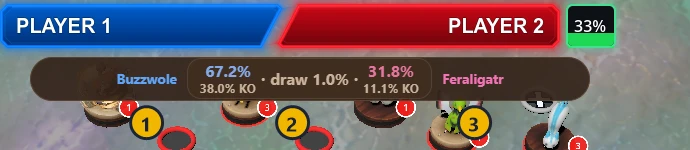
The bar sits at the top of the game, with the two figures on the field and their odds.
- Your figure, in blue, with its level when it is 5 or 10. Won shows before it when you win the battle.
- The odds: your chance to win, the draw ("both out" under it when both can be knocked out), and their chance. With KO chances on, the share of wins that knock out sits small under each. Click them for the odds table: every attack against every attack, with the cells the wheels stopped on marked. Point at a cell to see why it ends that way. Click the odds again to close it.
- Their figure, in pink, with its level, then Won or Draw once the battle is over.
When a battle starts the bar moves to its battle spot, and keeps the result there for a few seconds after. Until both figures are known it says "DuelDB · pick both figures". A name that starts with "If", like "If Mega Blaziken", is a What if you clicked in the panel, not the game.
The panel
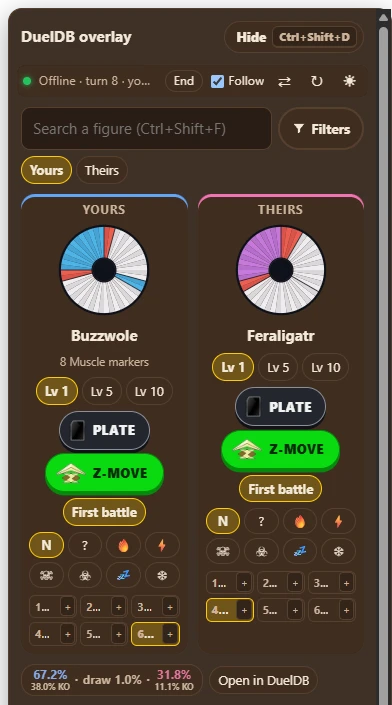
The panel is as tall as the game and scrolls. From top to bottom:
- At the top
- "DuelDB overlay" and Hide (Ctrl+Shift+D), which closes the panel. Under it: The kind of match (Offline, Campaign, Ranked, Room, or Mayhem with its name), the turn and whose turn it is, with a green dot while it follows a duel. Follow on follows the game; off, you set everything yourself. ⇄ swaps the sides: yours and theirs change places, for when the overlay has you on the wrong side. ↻ reloads the overlay, and the app hands it the duel again. ☀ / ☾ makes the overlay light or dark.
- Notes
- The duel's weather, and in Mayhem whether the odds use the game's Mayhem wheels (during its battles) or the normal ones.
- Search a figure
- Find a figure by name and put it on the field, for the side picked next to the box: Yours or Theirs. After yours, it switches to theirs. While the overlay follows a duel, the figure you pick stands in for the game's in that slot until the game's figure changes.
- Yours / Theirs
- The figure on the field of each side: its wheel as it battles, its name, and where it is (P.C.,
Ultra Space, Excluded), its Wait, marker and Chain Level. Under it:
- Lv 1, Lv 5, Lv 10: its level.
- Plate and Z-Move: this turn's plate or Z-move. The ones the game says were played are set for you; a new turn clears them.
- Time Travel, while that side has Celebi still in the duel (its Time Travel works from the field, the bench or the P.C.): if that figure does not win, the battle rewinds once and plays again, as in the battle simulator. The odds, their table, What if and "can attack" count it. A new duel turns it off.
- Next to or 2 steps away, for a figure that can attack from further away (Kartana, Aegislash Blade Forme, Blastoise…) on its turn: whether it attacks from range, for abilities that count it. The board decides until you pick; the pick holds for that pair this turn.
- First battle: on when it has not battled since it moved to the field, for abilities that count then.
- N (normal) or a special condition, by its icon. Point at one for its name. Also while following the game: set one to see the odds with or without it; it holds until the game's condition for that figure changes.
- Form, only while not following the game: its evolution, Mega or Primal form. For Ditto, Ditto copies picks the figure it copies.
- Slots 1 to 6
- Each side's figures, in the game's order. Click one to put it on the field. A figure in the Ultra Space or excluded cannot be picked until it comes back; one in the P.C. can, for a Max Revive. Under each name, chips show its level, where it is (Field, Bench, P.C., Ultra Space, Excluded), its Wait, special condition and marker, as the game has them.
- Can attack
- Before an attack, when a figure can attack more than one figure: "Your … can attack:" with your chance to win against each, and how many steps away when more than 1. The overlay puts the attacker's best target on the field; click another to see that battle.
- Odds
- The same odds as the bar; click them for the table. Open in DuelDB opens the battle simulator in the DuelDB app's window with these two as set up here: level, condition, Chain Level, Wait, times evolved, the weather and the Mayhem mode. The plate and Z-move stay behind.
- What if
- While following a duel: your chance to win if a figure on the field switches form now, by a Mega Evolution, Stance Change, Ultra Burst, Necroizer, DNA Splicers, Gracidea, an orb from the bench, or another Deoxys forme when it is attacked. Now is as they are; their figure's forms follow "If their … switches:". Click one to show it on the bar for now. Now, the same one again, or the game moving on goes back. "Lv ?" means the level of that form is not known, so it plays at the level it has now.
- Spins
- Where the game's wheels stopped (Spin, Respin, Shift, Final) and who won.
- Turn
- Not set, Yours or Theirs: whose turn it is, for abilities that count when attacking.
While the overlay follows a duel, the game sets all of this. What you change yourself stays on top, for that figure: a level while it stays that figure, a condition until the game's changes. A new duel starts clean.
Settings
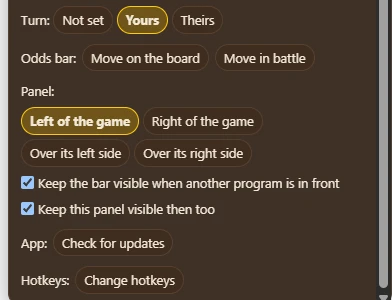
At the bottom of the panel. They are kept on this PC.
- Odds bar
- Move on the board or Move in battle: the bar gets a dashed edge. Drag it where you want it, then press Done. It has one spot for the board and one for battles, both at the top middle of the game at first.
- Panel
- At first beside the game's right edge, or over its right side when the screen has no room there. To move it, press anywhere on the panel off its buttons and drag it, on the game or beside it. It keeps that place by the game, also when the game window moves. Put it back beside the game docks it again. Moving it needs DuelDB app 0.2.5 or newer.
- Keep visible
- Keep the bar visible when another program is in front, and Keep this panel visible then too: they stay on the game instead of stepping aside. They are still right above the game, so a program over the game covers them where it overlaps. If the panel says "This needs a newer DuelDB app: check for updates.", update the app.
- App
- Check for updates looks for a newer DuelDB app. It also looks each time it starts.
Hotkeys
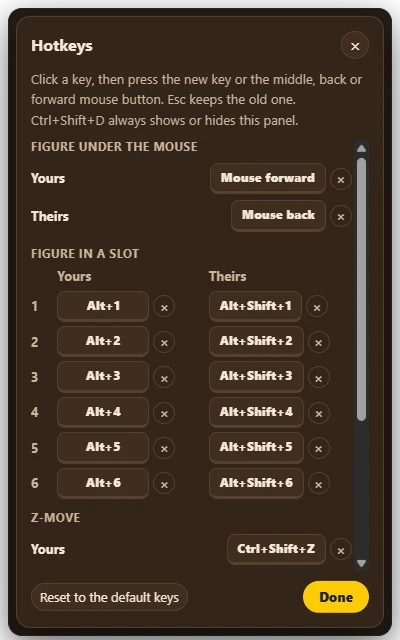
They work while the game or the overlay is in front; the rest of the time they are free for other programs. By default:
- Show or hide the panel
- Ctrl+Shift+D, as Hide does. Without the game it opens the panel on its own, at the top right of the screen, to set up a matchup yourself. This key cannot be changed.
- Your figure under the mouse
- Alt+M. The figure you point at goes on the field, on the board or on its bench spot. Only in a duel the overlay follows.
- Their figure under the mouse
- Alt+O. The same for theirs.
- Your figure 1 to 6
- Alt+1 to Alt+6. The figure in that slot goes on the field.
- Their figure 1 to 6
- Alt+Shift+1 to Alt+Shift+6. The same for theirs.
- Your Z-move
- Ctrl+Shift+Z. Each press turns on the figure's next Z-move, and after the last one, none.
- Their Z-move
- Ctrl+Shift+X. The same for theirs.
- Swap sides
- Ctrl+Shift+S. Yours and theirs change places. Use it when the overlay has you on the wrong side.
- Search a figure (when not following)
- Ctrl+Shift+F. Opens the panel with the search box ready, for theirs once yours is set. Press it again to switch sides.
- Show the odds table
- Ctrl+Shift+T. Opens or closes the odds table in the panel.
- Open the matchup in DuelDB
- None. Does what Open in DuelDB does. It has no key until you give it one.
To change one, click Change hotkeys near the bottom of the panel, then the key next to it. Then press the new key, with Ctrl, Alt or Shift if you like, or the middle, back or forward mouse button. Esc keeps the old one, × leaves it without a key, and Reset to the default keys brings back the keys above. A mouse button with a hotkey no longer reaches the game while it is in front.
Troubleshooting
- Nothing over the game
- Check that the DuelDB app is open, that you are logged in with your UX account, and that the game is in front and not minimised. Hide or Ctrl+Shift+D may have closed the panel: press Ctrl+Shift+D.
- The odds do not follow
- Look at the panel's top row. "Waiting for a match…" during a duel means the game shares nothing: update it to 1.1.3 or newer. Check that Follow is on, then press ↻. A figure, level or condition you set yourself stays on top of the game's, so set it back the same way.
- You are on the wrong side
- Press ⇄ at the top of the panel, or Ctrl+Shift+S. From 1.1.6 the game says which player you are. Before that the overlay goes by the game's match file, and in a room match by your saved teams in the game (at least four figures of one of them).
- A hotkey does nothing
- Hotkeys work only while the game or the overlay is in front, and another program may use the same key: give it another one under Change hotkeys. Your or their figure under the mouse needs a duel the overlay follows.
Creating a figure
Logged in, press + Create in the menu and pick Figure (or use Create figure on your profile).
- Details
- Name, MP (0 to 3), rarity, up to two types, evolution stage and ability.
- Wheel segments
- Every wheel is exactly 96 units, in steps of 4. The counter turns green when it adds up; you cannot save before that. Drag ⠿ to reorder.
- Colours
- White and Gold deal damage, Purple is rated in stars (1 to 4 on a wheel), Blue has an effect, Red is always a plain Miss.
- Known attacks
- Click an empty attack name to browse every game attack of that row's colour, or type to search them all. Pick one to fill in its colour, effect text, respin and battle rule; size and damage stay yours. The ability name works the same way.
- Shows
- How the damage prints, and what that means in a battle:
- 80x: spins again and hits once per landing. Set the most landings, or 0 for no limit.
- 80x multiplies: prints an x, like Round. Battles play it as 80.
- 80+: spins again once and deals the bonus if it lands again, like Leaf Blade. A bonus of 0 means no respin, like Attack Order.
- At 0 damage: Blank, Show 0, or Boost: spins again until another attack lands, which then deals more, like Swords Dance.
- Level 5
- Choose which attack takes the Miss's units at level 5.
- Battle rule New
- What an attack does in a battle, as one sentence: "When … then …". For example: when the
opponent's attack deals at least 120, it wins (Grass Knot); when the opponent is a Dragon type,
+50 (Dragon Pulse). Only when it helps is for a "you may" in the effect text.
Type the effect text and the rule fills itself in when the text describes one: "If the battle opponent is a Water type, this attack deals +20 damage" gives "vs Water type: +20". The line under the attack then says Battle rule from the text. Open the rule or remove it to set it yourself; after that the text no longer changes it.
- Z-moves
- Type Z-moves are added automatically; add up to three unique ones.
- Evolution line and forms
- Link it to your other figures, as the same evolution line or as alternate forms.
- Visibility
- Public shows it on browse pages. Private hides it there; anyone with the link can still open it.
Creating a plate
Press + Create in the menu and pick Plate (or use Create plate on your profile). Set its name, category, rarity, damage, cost and effect text; the preview shows the plate as it will look. Visibility works the same as for figures.
Profiles
- Everyone has a profile at
/user/their-nickname: their banner and picture, how many figures and plates they made and the likes they got, then their public figures and plates. - Click a creator's name on any card or page to open theirs.
- Supporters show their name as a pill with the EX or UX logo. Their profile can also show a GIF picture and banner, an effect around the picture, and a favourite figure and plate.
- Your own profile is also where you manage your work: it shows your private items too (marked Private), with Create, Edit and Delete. Others never see the private ones.
Likes
Press ♥ on any figure or plate, on its card or its page. Filled pink means you liked it; the number is how many people did. My likes lists everything you liked, and only you can see that list.
Account settings
- Profile picture
- Upload one; it is cropped to a square. Without one, your initial shows.
- Banner
- Across the top of your profile. The whole picture is kept: drag it to choose which part shows. Without one, the DuelDB colours show.
- Supporter looks
- For supporters: a GIF as picture and banner, an effect around the picture, and a favourite figure and plate. When a membership ends, the last still picture and banner come back; renew and the looks return.
- Nickname
- Shown on everything you make, and part of your profile address.
- Private account
- New figures and plates start as private.
- Existing creations
- Make all of them public or private at once.
Theme, sound & cookies
- Theme
- The sun/moon button, top right. The mode is System (follows your device), Light or Dark. The look goes over it: Modern (the current look), Classic (the 2017 DuelDB look), or for supporters the colours of a Pokémon type.
- Sound
- Bottom right. The speaker mutes every sound; the note plays background music, with volume, loop and skip controls. Supporters also hear extra Pokémon battle songs.
- Cookies
- Google Analytics only runs if you accept it. Change your choice at any time under Cookie settings in the menu.
Supporting DuelDB
DuelDB is free, and creating stays unlimited. Become a supporter with a DuelDB EX or DuelDB UX membership on Ko-fi to pay for the site and new features, and get extras. Pay with the same email as your DuelDB account, so your status reaches it.
- Overlay
- DuelDB UX, in the DuelDB app for Windows: your odds on top of Pokémon Duel Remake while you play. See Overlay.
- Counter finder
- DuelDB UX. Open it with Find counters on any figure page, or Counters in a battle. It plays that figure against every Library figure and lists the counters that win against it most often and the figures it beats. Equal win chances go by draw chance. With KO chances on, both lists rank by how often a win knocks out, counted as the KO switches say. Filter both lists by rarity, MP and type. Set up the battle: Level 5, a special condition, Wait, a plate and Modifiers for your figure and for every Library figure alike, your figure's Chain and times evolved, and a Chain Level for the Library figures on their strongest attack. Library Mega Evolutions have evolved once. Abilities count, with switches for the first battle and whose turn it is, and so does the weather; Mega Evolutions can be left out. Details on each row opens that figure.
- 6v6 teams
- DuelDB UX, under Battle in the header. Build two teams of up to six figures (at most 3 of one Pokémon, unless its ability lifts that limit), each at Level 1, 5 or 10 and evolved 0 to 3 times, and see every matchup's win chance, the best answer to each figure of the other team, and the Library figures that beat each team. Level 10 puts the five Carmonite points into the attack that grew at Level 5, taken from Misses first; switch it to Manual to place them yourself. Counters next to a figure opens the counter finder for it. Save your teams to load them again later. Set a figure On the field and its ability reaches its teammates there (Groudon gives Ground and Fire types +20 and +1★), and give a figure a special condition, or Arceus the type it took with Multitype. Plates in play count for each team, as the game's own rules have them: the type Powers, Steel, Flame, Tropical and Dark Energy, the Metal, Flame, Venom, Golden, Guardian and Grass Spheres and Red and Blue Orb while the Pokémon they are on is on the field (Red Orb: +10 and +1★ for Fire, Ground and Grass types while its Primal Groudon stands there; Grass Sphere: attacks cannot move Grass types to the bench, P.C. or Ultra Space, though they can still knock them out), held items like Charcoal for the Pokémon they are on, and the Rotom appliances that give every Pokémon their type on top of its own. Electro Energy and Electro Sphere count the Electric types next to the battling one, so only the overlay counts them. Plates that only move Pokémon are left out. Abilities that keep a Pokémon from being moved by attacks count as well, like Mawile's Fang Trap, Snorlax's Still and Arceus's Multitype (not excluded). In the DuelDB app, Sync with the game fills both teams as the overlay sees the duel now: each figure's form (Mega Evolutions too), level, Chain Level, condition and place on the field, the plates in play, the weather, Mayhem and whose turn it is. The game does not tell the type Arceus took, so pick that yourself.
- Brackets
- DuelDB UX, under Battle in the header. A knockout of 2, 4, 8, 16 or 32 figures: add them yourself or fill at random from the Library, the community, your likes or your own figures, narrowed by rarity, MP, evolution stage and type. Set best of 1, 3 or 5, and chaos rolled fresh for every battle (level, Z-moves, surprise plates). The winner of a match can evolve for the next round (Charmander to Charmeleon), and Mega Evolve when it has no next stage. What a battle leaves behind carries on: a special condition (Poison Touch, Poison Jab, Nuzzle when its figure is knocked out by damage), a type change (Forest Mystery), or an effect for the next battle (Shadow Beam, when the opponent is still in after it). An attack's effect counts when it meets the right colour, whoever wins: a White attack's against White or Gold, a Gold attack's against White, Gold or Purple, a Blue attack's against anything but Blue, and a Purple attack's, or any attack's against a Miss, when it wins. A winner takes it into its next round, and in a best of 3 or 5 both figures take it into their next game. A draw counts as a battle, so what it leaves plays in the spin again. A knocked out figure loses its special condition and type change, unless the setting keeps them. A figure that evolves always loses them. Sleep and freeze last one battle, as in the game: a figure put to sleep or frozen (Sing, Ice Beam) battles its next battle that way, and then it clears. The first battle of the first round is every figure's first battle after moving to the field, and so is a figure's first battle after it evolves (Gale Wings counts again for Fletchinder and Talonflame). Spin plays each battle on the battle screen, where a draw spins again; when neither figure can ever win (two poisoned Level 5 Magikarps), a coin flip decides. Finish instantly works out the rest at once. Save a finished bracket to open it later, or play it again with the same figures.
Still stuck, or found a bug? Ask on the Discord (the blue button), where the Pokémon Duel Remake community is.
Comments
Anyone can read the comments under community figures and plates. Log in to write one, reply two levels deep and edit your own; at most 10 comments in 10 minutes. Makers can delete any comment on their own creations, and Comments on my creations in the account menu shows what is new. A deleted comment with replies stays as "This comment was deleted", so its replies stay readable. Report a comment that breaks the rules.